
Google AdSense Revenue Calculator
Estimate your website's potential ad revenue through our advanced AdSense calculator. Adjust traffic, region, and niche to forecast earnings accurately.
Estimate Ad Revenue Forecasting for Website By Adjusting Key Parameters
This AdSense revenue calculator provides a comprehensive simulation of potential earnings based on your website's traffic, content niche, and geographic audience. By adjusting the monthly pageviews, selecting your target region, and choosing the appropriate content category, you can forecast your site's ad revenue with precision.
Basically, Most of the ad revenue is generated from high-intent commercial niches and Tier-1 geographic regions. This tool allows you to explore how these factors influence your potential earnings, enabling informed decisions for content strategy and monetization.
You may see there in Google Default mode has 3 Tier regions (Americas, EMEA, APAC) and 15+ content categories with their respective estimated Page RPMs. In Custom CTR & CPC Simulator mode, you can fine-tune your revenue projections by specifying your own click-through rate, average cost-per-click, and the number of ad units displayed per page.
In your mine, You have a question why estimate earnings are different based on the selected region and content category? The answer is simple, because advertiser demand and bidding behavior vary significantly across different niches and geographic locations. High-value commercial categories attract more competitive bids, while Tier-1 regions have stronger advertiser budgets, resulting in higher RPMs and revenue potential.
Some data points and insights that can help you understand the revenue estimation process better:
Targeted Niche Valuation
Different content verticals experience vastly different advertiser bidding appetites. High-intent commercial categories like Finance, Insurance, and Business Industrial Software command much higher Cost-Per-Click (CPC) rates than general entertainment or news outlets.
Geographic Benchmark Adjustments
Ad revenue potentials fluctuate heavily based on visitor origin locations. Tier-1 economic regions such as North America and Europe yield significantly greater RPM performance than emerging markets due to localized advertiser bidding power.
There is a interesting fact that the average Page RPM for a Finance website in the Americas region is around $38.50, while the same category in APAC may only yield approximately $9.80. This stark contrast illustrates how both niche selection and geographic targeting are critical factors in maximizing ad revenue potential.
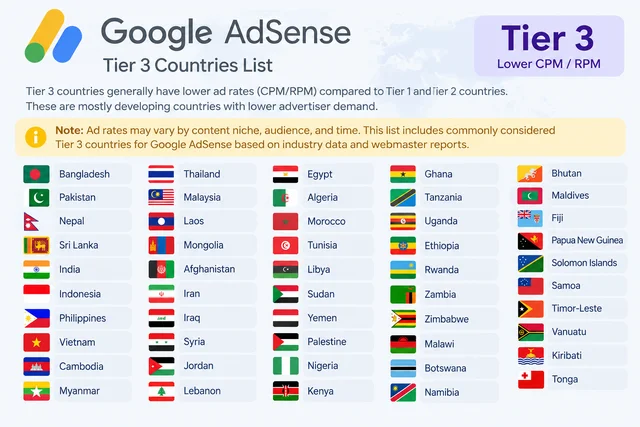
So You might be clear same traffic and same content category, but different geographic regions can yield drastically different revenue outcomes. This is why it's essential to consider both niche and audience location when estimating potential AdSense earnings.
Why We Built This Calculator?
The official Google AdSense website already has a revenue calculator, so why did I build another one? There is an interesting story behind it. When I first used the official calculator, I saw the estimated revenue and assumed it represented monthly earnings.
Several days later, I realized that the result represented annual revenue—the total projected earnings over 12 months. I was confused, so I revisited the official calculator and confirmed that it shows annual revenue projections.
That is why I built this calculator to show daily, monthly, and annual revenue estimates. I also introduced a custom mode that lets you simulate your own CTR, CPC, and ad unit count to explore how these factors might influence your potential earnings.
A guide for using the calculator
Mode 1: Adsence DefaultEasy Method to estimate your potential AdSense revenue based on your website's traffic, content category, and geographic region. This mode uses Google's default Page RPM values for each category and region to provide a quick revenue estimate.
Select Geographic Region
Choose your target audience region (Americas, EMEA, or APAC) as advertiser budgets and CPM rates vary significantly across geographical tiers.
Pick Content Category
Select your niche. Commercial intent categories like Finance and Business command higher CPC bids than entertainment or news.
Adjust Traffic Volume
Use the monthly pageviews slider to evaluate daily, monthly, and yearly revenue expectations instantly.
Advanced Method to simulate your own revenue projections by specifying custom Click-Through Rate (CTR), Cost-Per-Click (CPC), and the number of ad units displayed per page. This mode allows for a more tailored estimate based on your unique website performance metrics.
Select CTR
Adjust the Click-Through Rate (CTR) slider to simulate how changes in user engagement with your ads can impact overall revenue. A higher CTR indicates more users clicking on ads, leading to increased earnings.
Select CPC
Set the Cost-Per-Click (CPC) value based on your industry and the competitiveness of your ad placements. Higher CPCCs can significantly boost your revenue potential.
Select Ads Per Page
Choose the number of ad units displayed on each page. More ad units can increase revenue, but may also affect user experience and engagement.
Adjust Traffic Volume
Use the monthly pageviews slider to evaluate daily, monthly, and yearly revenue expectations instantly.
Calculation Procedure & Frequently Asked Questions
Our calculation engine operates on standard programmatic auction algorithms derived from verified publisher data:
Calculates earnings by applying the active Page RPM for your category and region against your total traffic volume:
Computes revenue based on estimated monthly clicks derived from your custom CTR and ad unit count:
Frequently Asked Questions
1. What is Page RPM in Google AdSense?
Page RPM stands for Revenue Per Mille (thousand). It represents the estimated earnings you accrue for every 1,000 page views your website receives.
2. Why do RPM rates differ across countries?
Advertisers allocate larger marketing budgets in Tier-1 regions (such as the US and Canada) compared to emerging markets, leading to higher competitive bidding and CPC rates.
3. How can I increase my website's AdSense revenue?
You can improve earnings by optimizing ad viewability, targeting high-intent commercial keywords, increasing organic traffic from Tier-1 regions, and testing responsive ad unit placements.
4. Are these calculated revenue projections guaranteed by Google?
No. The calculations provided by this tool are strictly estimates based on industry-wide statistical benchmarks. Actual earnings vary based on ad placement, seasonal fluctuations, and user engagement.
5. How does the Advanced Custom Simulator mode work?
The Advanced mode allows you to manually input your own Click-Through Rate (CTR), Cost-Per-Click (CPC), and number of active ad units per page to calculate customized earnings independent of preset regional averages.
We never claim that the amount calculated here is what you must earn. Actual AdSense earnings depend entirely on numerous variable factors beyond our control, including but not limited to: visitor user behavior, ad viewability rates, seasonal advertiser budget fluctuations, ad block usage, traffic source quality, and policy compliance status. Projections provided by this tool are strictly for estimation and planning purposes.

Rana Bepari
Lead Software ArchitectFull-stack engineer and platform developer specializing in high-performance web applications, programmatic monetization architectures, and secure client-side utility tools. Committed to building reliable software platforms that prioritize user privacy and performance.
Related Utilities & Tools
Explore other web optimization tools designed to scale your traffic and revenue.
Commission Calculator
Calculate sales commissions and earnings across tiered commission rates.
Compound Interest Calculator
Compute compound interest growth and investment returns over time.
Discount Calculator
Calculate final discounted prices, total savings, and promotional deals.
EMI Calculator
Calculate Equated Monthly Installments and loan amortization details.